As of 2012, there are now more smartphone sales than there are traditional PC sales (desktops and laptops). This trend looks set to continue, meaning in the next few years, mobile devices will be the primary platform for the consumption of content, media, and social interaction. The two most dominant platforms in this new mobile market are Android and iPhone devices.
In order to support these types of devices, the core optimizations to a web page involve fixing the zoom to something logical, and then rearranging and resizing page components to ensure quality layout on mobile. The first item, fixing the zoom level, is achieved by adding a single meta tag to the web page. The latter optimizations can be much more complicated, but are sometimes handled automatically by templating systems.
The first decision to make when making a mobile optimization of a website is to decide how to trigger or detect mobile websites. One of the most effective ways to do this is to perform server side user agent detection. You can also perform user agent detection client-side. I find this to be less reliable because you end up mixing a lot of presentation information in with logic when you have to deliver the page, and then rearrange or modify it after rendering has begun. The final way to trigger mobile optimization is with media selectors, detecting screen sizes. This technique allows users of traditional web browsers to see the benefits of mobile optimization.
For MortalPowers, I went with performing server-side detection of moibile devices. I identified Android and iPhone specifically to provide mobile optimized website. For the mobile-optimized site, I disabled the navigation bar, swapped out the advertisements in desktop size for advertisements in mobile size. Fortunately the way the site is laid out, all of the pages rap the same HTML template. I was able to tie mobile detection into the branch of the code that reads and leverages the template, and use an alternative template. This template includes alternative standard items, including the HTML5 mobile meta tag for view control. Finally, it includes a mobile customized css in addition to the stanard css. This allows me to hide page components, and to resize things like image that can break the fixed size metaphore.
Lastly, its important to give your users the option to opt out of a mobile optimized site. You can do this by providing a link to disable mobile, but make sure you don't lose the page the user was looking at, and make sure you keep the user on the full site, rather than forwarding them back to the mobile site with each page load.
permalinkRunning a website requires numerous 3rd parties that provide a wide variety of services. From a domain name, to hosting, to DNS hosting, to SSL certificates, to email servers, there are a lot of pieces that one can easily forget about once they are set up properly. This is a good thing because if the technology works as originally intended, there should be no maintenance time or cost. Aside from just maintainability, you should take time every few years to re-evaluate the providers you rely on. Are there better, or cheaper alternatives? Do you need the services you are paying for, or do you possibly need additional services that you didn't need when you were smaller? I recently took a look at several of my providers and have decided to make some changes.
Hosting and DNS, From Slicehost to Linode
I used slicehost for a long time. 3 years ago, they were competitively priced, offered a great set of tools for the creation and management of virtual servers. About a year ago, they were puchased by Rackspace. This purchase started a long downhill climb for them. The first issues that I had with them was several repeated bouts of downtime. Second, we started having issues where our servers would suddenly become completely unresponsive. With their purchase by Rackspace, it became clear that they were going to move me to the Rackspace Cloud, which had a worse interface with fewer features compared to the original Slicehost. Lastly, despite having signed up 3 years ago, their prices are the same today as they were back then. I evaluated a few alternatives, such as Prgmr, a fully command-line based bottom-of-the-line VPS service. Although the prices were good, I decided that the lack of DNS hosting, and the need to learn Xen commands was unappealing to me. I also evaluated Linode, and determined that they have full feature-parity with Slicehost, and double the server capabilities for the same price.
Moving to Linode
To move my systems, I created a Linode account started up the smallest available node size. While my node was constructing, I logged into the DNS managers of both Slicehost and Linode side by side, and spent 5 minutes copying all of the records from one to the next. I left the IPs the same until I could get the new server setup. Then, I methodically rsynced several folders between the old server and the new.
- /var/www/
- /etc/apache2/sites-enabled
- /etc/postfix/
- /etc/ssl/
Once I had copied the files, I needed to re-enable the PHP mods I was using, install all of the necessary packages, and transfer the database. From there, I started up apache, checked that everything was good to go, and updated my DNS settings to point to the new server.
Domain Names and SSL - Godaddy to Namecheap
With Godaddy's SOPA support, and a clear profit-centric website, I decided to evaluate other domain name providers. For me, a domain name registrar needs to be as cheap as ICANN allows, provide WHOIS, and preferably just get out of the way of me using their services. I also prefer to have my SSL certificates come from the same provider to save me time.
Moving to Namecheap
Transferring domain names isn't the easiest thing in the world, but it's definitely doable. It will require that you extend any of the domain name purchases for an extra year. In order to minimize the cost of transferring all of my domain names, I settled on a 4 stage plan. Once per quarter, I would transfer the next 1/4th of my domain names based on expiration date. As of February, I have transferred half of my domain names. There are several great articles about how to do this, but the general steps are:
- Generate Authorization Code - See http://help.godaddy.com/article/1685#active
- Unlock the domain names you wish to transfer
- Purchase the transfers on NameCheap
- Enter the Authorization Code
- Make sure to setup the nameservers correctly. These can take up to 72 hours to propagate (more often 5-6 hours).
- Approve the transfer request you receive in email
permalinkI need to make some decisions soon about MortalPowers.com. This includes questions about the appearance, functionality, the focus of my time, and what sort of browsers and codecs I want to support. To answer these questions, I'm going to try to go back to the original question, which is asking myself what are my goals, and why am I building this site.
What is my goal with this website? My goal is to increase traffic, to provide a place for my development projects to live; grow; and be shared, and finally to meet the needs of my visitors.
The last goal is going to be one of the most central, because it will inform the first two. But to answer this question, I need to know as accurately as possible, who are my visitors? I'm going to use the last month as the window and breakdown my traffic from multiple source (Google Analytics and AWStats primarily).
Who visits my site?
Browsers
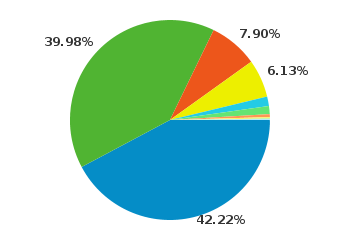 Right out of the gate, 8% of my visitors will be unable to view any HTML5 videos. At this point, I'm comfortable instantly dropping the 8% of my visitors that still use Internet Explorer. This is partially a philosophical decision, but it's also in part because most of the people that come using that browser will have no interest in anything I have to say.
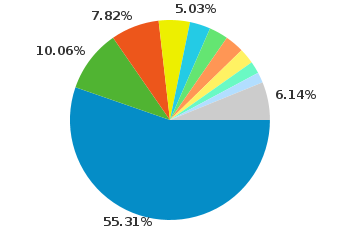 Only about 3% of my Firefox users will be unable to view my Ogg Theora videos. This indicates that Firefox users tend to update their browser relatively frequently. This is great, because Firefox and Mozilla have committed to support to a lot of the technologies I want to use and support.
Operating Systems
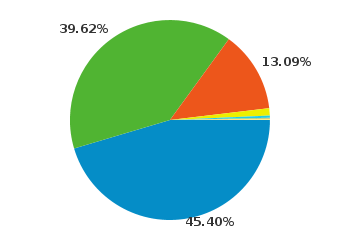 It seems that a major plurality of my users (45.5%) still use windows to access my site. This is acceptable to me because Windows users can still be interested in Open Source, in software development, or even interested in trying or understanding Ubuntu. I will try to do what I can to support these individuals. As an interesting tidbit, Windows use ends up breaking down as follows for me: 43.9% use Windows 7, 39.22% use Windows XP, and 14.03% use Vista, the rest use Windows Server 2003.
Screen Resolution
Less than 7% of my users have screens of 1024 width, everyone else has 1280 or much greater.
What this means for Video
One of the goals that has most recently bubbled to the surface for me is the idea of supporting my video gallery on mobile. I'm continually disappointed with YouTube's mobile site because their video collection is a subset of their full video gallery. Looking at the video support offered by the users of my site, I can cover almost all of my desktop users with Ogg Theora, and until WebM becomes a universal standard, this will be the universal standard. I'm not anticipating WebM to become available across my user base until at least 2012, but time will tell. On mobile, the only option is to use .h264. Based on these competing values, I'm going to attempt to have 2 encodings for each of my videos. I'm not sure yet whether this will mean I have a mobile version of the gallery, or whether I will try to use a single HTML5 video gallery with multiple sources, and I'm definitely open to feedback.
Over the next few months and years, I'm anticipating that mobile usage of my website will grow from the lowly 1% to 20%-50%. Google itself has declared a "mobile first" strategy, and the human workflow of using a phone seems to be much more natural than the bulky process of using a laptop or desktop computer, despite the speed, cost, and additional capabilities provided by desktop computers.
I hate the idea of supporting the .h264 standard, but until WebM is available, I'm going to have to make a decision in favor of my users, rather than in favor of my philosophy that Android and iPhone and Internet Explorer seem to have already rejected. It still makes no sense to me why the mobile phones and Internet Explorer don't at least offer Theora video decoding, since the software is free (as in speech) for them to implement.
permalinkIt seems that over the past two days, a bot or two has begun spamming my comment form with junk content. In general, I'm pretty trusting of users that comment on articles, requiring only that those who wish to comment pass a simple CAPTCHA. I use ReCAPTCHA, but apparently this has been bypassed sufficiently well to allow spammers to make it through, or there are malicious human beings out there trying to make a buck by spamming my comment forms.
Despite the fact that all HTML is escaped before being displayed on my comment pages, this is still a nuisance and gets in the way of valid data on the comment pages of my site. To deal with this, I have added a couple new protections. I now track the IP of comments (for spam banning purposes alone), and have built in capabilities for myself to mark items as spam. I'm actually keeping the spam in the database, because if I need to, I will apply some Bayesian filtering.
How would Bayesian spam filtering work?
Bayes' Theorem is a theorem that describes the likelihood of events given other events. For more detailed information check out the wikipedia page for Bayes' Theorem. Using this theorem, computer systems can look at past messages that have been spam, or not spam, and based on the contents of a future message, make a prediction or assign a probability to whether or not it is spam, without human interaction. This is most often used with email systems, but it would work just well for my commenting system.
Hopefully spammers realize it is futile, or I can just ban an IP block, but if those are unsuccessful, I don't want to manually need to groom all comments on my site, so I may implement a Bayesian filter. If I do need to, I'll post details about the implementation, and possibly source code at that time. This could also have a big impact on my video submission system, but time will tell. I've already had to change the URL of my comment system several times, and I've considered eliminating it entirely.
What do you think about spam and what steps are reasonable to vet visitors and content submitters?
permalinkGitosis is a git repository management tool. It has features that make multi-repository, multi-user environments much simpler. The way you access the configuration is through git. You make configuration changes in your working copy, and then push them to the repo. These changes are then processed by git hooks to create/manage the repositories and keys.
One of the downsides of gitosis is that all administrators have equal permissions to add/remove keys, and there is no mechanism for users to manage their own keys. In response to this I have begun building Gitosis Web, a PHP frontend to gitosis that adds some extra capabilities and ease of use.
Many people are comfortable with Gitosis, and that's great. This tool doesn't replace Gitosis or say there are any issues with Gitosis, but simply that some workflows could benefit from an additional frontend.
Check out Gitosis Web on github
Gitosis Web Readme
Gitosis Web
Gitosis Web is designed to is designed to be a layer on top of gitosis. Leveraging PHP and extra properties stored in
the gitosis configuration to allow and administrator to control the entire file, and to allow individual users to manage
their keys.
Install Instructions
To install, you will need working installations of git, gitosis, php, and mysql. This system has been tested under
linux, but might work on windows too (Assuming you have git in your PATH). Once you have this, make sure your apache
user (probably www-data) has a checked out copy of gitosis-admin, and that it has a key setup with the gitosis server
you want to administrate. You should add a "name = x" row for your adiministrator to the [gitosis] section, and an "x =
pass" section to specify the cleartext password.
Once you have it setup, you load the web interface, specify the path of the gitosis-admin working copy, and provide a
username and password. From there you can make changes to the gitosis configuration, or add keys to already specified
users. Each user should get a group looking like [group user-stephen].
Future Plans
At some point in the future, I hope to add the ability to manage users without tweaking the gitosis.conf file, or allow
users to manage their own keys. Allowing project owners might be a cool idea, but might make the interface too
complex.
permalink

 For the new year, I wanted to actually put one of the projects I have been working on out to the public. The game is called HexSLayer.