
Development Articles
Angular and Python Are Marketing Wrong
by Stephen Fluin 2015.05.16Create Your Own Mobile App Privacy Policy
by Stephen Fluin 2014.06.08Chrome Cordova Apps - cca create bug
by Stephen Fluin 2014.05.30
Failed to fetch package information for org.apache.cordova.keyboard
If you have experienced this error, you aren't alone. Any projects being created with version v0.0.11 of Chrome Cordova Apps (cca) are now failing to be setup properly.
The change comes from a desynchronization between Cordova's plugin library and the cca tool. This has been fixed by the developers in the latest source code on Github, but not released as part of npm.
The easiest way to get around this bug is to edit
, and change line 53 from:
to
After that, cca should work just fine again, allowing you to create new projects.
permalink
A Year of Android Studio
by Stephen Fluin 2014.04.30 It has almost been a year since Google IO 2013, where Google Announced a new IDE for Android, called Android Studio. Android Studio has been a major problem for developers and development companies since this date due to the schism between Eclipse and Android Studio.
Developers have to decide whether they build applications using Eclipse and Ant using the stable toolchain and tools they have been using for years, or whether to adopt the less stable and constantly changing Android Studio. What complicates this matter is that new Android capabilities and support and documentation is coming to Android Studio faster than Eclipse.
Grade at the Heart
Whether JetBrains or Eclipse have figured out the "best" way to build an IDE doesn't really matter to me as a developer. What matters most is that my toolset gets out of the way of me writing great applications.
This may be my naivete or lack of skills, but I find Gradle to be a terrible build system. It's not terrible from a feature set, or from it's logical architecture or flexible structure. It's terrible because it gets in my way. With Eclipse and Ant, the Android build system is exposed to me as a single file configuring the use of proguard. This file is optional. To get any Android application to work, I just need to tell Eclipse that it's an Android app, and it will handle the build process. My code will work if I create a new project, or if I move my code into someone else's system.
With Gradle, this process is bad. When I check out code from the internet and try to import it into my project, it fails. If I am missing one of the five gradle files that have meaningful configured content that I must protect, nothing is going to work on my application. Why is this build system trying to hard to get in my way?
Example Gradle Failure - ChromeCast Video for Android
Code sharing should be easy. To help developers learn to build applications for ChromeCast, they have created and released a starter project called CastVideos-android. This project is available publicly on Github here:https://github.com/googlecast/CastVideos-android
When I clone this project and attempt to import it into Android Studio, everything seems to go wrong. The first time I attempted to open it, it opened the /gradle/ folder, rather than the project file, meanining there was no source code. The second time I tried, I noticed that it wanted me to find the gradle.settings or build.gradle files, and I did that, but then my project wouldn't run because Error, configuration with name 'default' was not found. How am I supposed to fix that? Your default configuration is missing? Gradle is too complicated, and its use and existing right next to working code means it gets in the way of development.
SEPARATE BUILD AND DEVELOPMENT PROCESSES. I understand they are connected and should be as smooth as possible, but look at Yeoman and Grunt, these tools do the same thing Android Studio is trying to do with Grunt, but they do them much better.
Summary
Gradle may be great for huge teams or multi-year development projects, but I would argue that most of Android development doesn't happen this way. Android is most commonly used by small 1-5 person teams that need to write code quickly and get it out to users.
permalink
Getting Started with Chrome Cordova Apps (Chrome Mobile Apps)
by Stephen Fluin 2014.04.28Photospheres Begin to Penetrate the Internet
by Stephen Fluin 2013.05.03Start Coding in 2013
by Stephen Fluin 2013.01.03The skills involved with software development don't have to be black magic. There are several great services that have launched in the past year to help individuals start to work with code, and to work on their programming skills. Learning to program is like learning a spoken language in that doing so has a lot of secondary benefits beyond the direct skill. Programmers have a well developed ability to create mental models for new ideas. They are able to adapt to change more quickly, and can develop a consistent logical framework for thinking about the world or a specific situation.
Codeacademy

Codeacademy.com has one of the best training programs anywhere for people who want to learn coding. In my experience, tools like this are in many ways superior to formal training or education. While formal training or schooling can give you a lot of the theory, background, and context, services like Codeacademy focus the user on writing code and solving problems. This real-world style experience where you aren't answering questions, but actually writing programs that are being run is a great way to experience not only the fundamentals, but also the power of a programming language.
When I first learned programming, whenever I encountered a new language's Hello World, I always got a smug feeling of satisfaction from the fact that instead of printing "Hello World", I would write a personalized message like "Bonjour Monde" or "Sup world?". This isn't a major feature that people typically discuss, but the ability for learners to deviate from the course in ways that they find interesting is critical in my opinion to the development of these types of creative skills.
Codeacademy has a decent variety of modern languages. Their most developed content is around javascript, which runs natively in your browser, and Python, which they have hooked up to a server based interpreter. Each course will take you through the entire process of developing an application, from flow control, to variables and math, to functions, classes and higher level concepts. The repetition of syntax can be helpful for experienced programmers learning a new language, but building yet another factorial method can be a little frustrating.
permalink
Google Needs to Move Faster With Android
by Stephen Fluin 2012.11.29Make your website more SPDY
by Stephen Fluin 2012.04.18HexSLayer Release Updates
by Stephen Fluin 2012.03.15How to Run Android 4.0 Ice Cream Sandwich in an Emulator
by Stephen Fluin 2011.10.18Optimize PNG images with OptiPNG
by Stephen Fluin 2011.08.17Multiple APK Management in Android Developer Console
by Stephen Fluin 2011.07.31
In May at GoogleIO, Google announced that it would begin supporting multiple .APK files, and finally this feature has come to fruition. To get started using this new feature, visit the Android Developer Console and click on your application. At the top of the application information you will notice that the upload .apk feature is now gone. It has been moved to a new tab at the top of the window, "APK files".
Using the Multiple APK Tool
Each of the .apk files that you upload to the Android Developer Console are examined. The system looks at the MinSDK version and the Target SDK version. The new features allow publishers to maintain multiple .apk files that target different screen versions, different version numbers, and OpenGL support. This is simultaneously a boon, and a potential disaster. It should decrease the difficulty of maintaining code that targets and supports different feature sets, but at the same time it supports the further fragmentation and differentiation of different Android devices. In an ideal world, the platform would be standardized in such a way that multiple versions wouldn't be necessary. In the practical world, Google continues to update and improve the API and platform. They break backward compatibility, and come up with new and better ways of performing software development and achieve better user interactions. This means that multiple .apk files will end up supporting the practical fragmentation of the platform.
One of the best ways to leverage these new abilities will be to fork applications at major points in platform revisioning. For example, it will soon make sense to have 3 different APKs, depending on how much historic support is desired. The first group would be platform versions 1.5 - 2.1. The second group would be 2.2-3.2. The final group would be the new Ice Cream Sandwich 4.0 platform version.
permalink
Simple Android Tips from Google IO
by Stephen Fluin 2011.05.10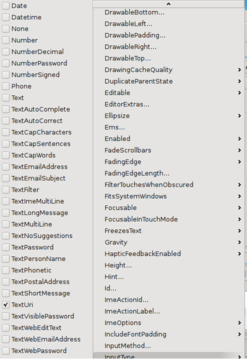
This morning I watched Google IO and learned several important details about android development that are not readily transparent as one begins developping Android applications. Fortunately, these items are extremely easy to address, and with a few minor changes, the usability and quality of your applications will drastically improve. I loved the presentations given during Google IO, and I could watch days of these sorts of tips, as Android development is a vast and expansive topic.
Tip 1: Specify TextType
This tip has to do with any EditText objects that you include in your application. When building android applications with text fields, you should inform the platform what the intent of the edit text is. You can do this in one of two ways. First is by editing the layout used by your application. Here is an example layout that includes an EditText that has been specified as a URL. This will ensure that the keyboard, whenever possible, shows the most appropriate keys for URL entry.
Use the code as follows:
The second menu is to set the setting via the UI.
Tip 2: Specify Audio Stream Control
This one is a quick fix. By default in Android the audio hard buttons control whatever audio is most foreground. This means that if you have audio playing, it will control that audio, otherwise it will default to the ringer. This one is easy to fix by calling the following code in your OnCreate:
Tip 3: Specify Target SDK Version
The final tip is something that I most likely missed as part of Android Development 101. By default, your application will not specify a minimum or target SDK. Not specifying a target SDK version means that the Android platform will assume your application uses the lowest SDK version, or uses the minimum SDK version that you specified. This is becoming more important starting with Honeycomb, because Honeycomb uses the Target SDK version for choosing some of the visual elements to show. The example that lead to my discovery of this was the menu icon. If you target the wrong SDK version, the menu icon will be shown, regardless of if you have a menu or not.
Fix it by specifying the correct versions. For me at the time of writing, they are as follows:
permalink
Web Development Tool: GZIP Detector
by Stephen Fluin 2011.01.04How To: Increase Session Time for PHP and Apache
by Stephen Fluin 2011.01.03Update for Reddit Imager
by Stephen Fluin 2010.12.23Apache Setup Problem: Getting Multiple Authentication Prompts
by Stephen Fluin 2010.08.02How I Make Tough Website Decisions
by Stephen Fluin 2010.08.01I need to make some decisions soon about MortalPowers.com. This includes questions about the appearance, functionality, the focus of my time, and what sort of browsers and codecs I want to support. To answer these questions, I'm going to try to go back to the original question, which is asking myself what are my goals, and why am I building this site.
What is my goal with this website? My goal is to increase traffic, to provide a place for my development projects to live; grow; and be shared, and finally to meet the needs of my visitors.
The last goal is going to be one of the most central, because it will inform the first two. But to answer this question, I need to know as accurately as possible, who are my visitors? I'm going to use the last month as the window and breakdown my traffic from multiple source (Google Analytics and AWStats primarily).
Who visits my site?
Browsers
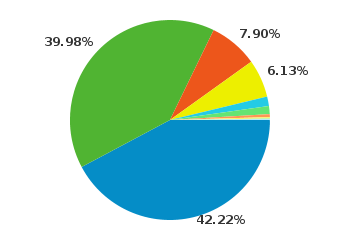 Right out of the gate, 8% of my visitors will be unable to view any HTML5 videos. At this point, I'm comfortable instantly dropping the 8% of my visitors that still use Internet Explorer. This is partially a philosophical decision, but it's also in part because most of the people that come using that browser will have no interest in anything I have to say.
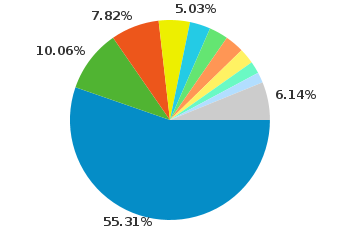 Only about 3% of my Firefox users will be unable to view my Ogg Theora videos. This indicates that Firefox users tend to update their browser relatively frequently. This is great, because Firefox and Mozilla have committed to support to a lot of the technologies I want to use and support.
Operating Systems
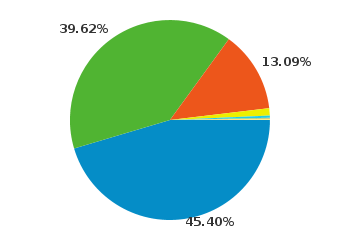 It seems that a major plurality of my users (45.5%) still use windows to access my site. This is acceptable to me because Windows users can still be interested in Open Source, in software development, or even interested in trying or understanding Ubuntu. I will try to do what I can to support these individuals. As an interesting tidbit, Windows use ends up breaking down as follows for me: 43.9% use Windows 7, 39.22% use Windows XP, and 14.03% use Vista, the rest use Windows Server 2003.
Screen Resolution
Less than 7% of my users have screens of 1024 width, everyone else has 1280 or much greater.
What this means for Video
One of the goals that has most recently bubbled to the surface for me is the idea of supporting my video gallery on mobile. I'm continually disappointed with YouTube's mobile site because their video collection is a subset of their full video gallery. Looking at the video support offered by the users of my site, I can cover almost all of my desktop users with Ogg Theora, and until WebM becomes a universal standard, this will be the universal standard. I'm not anticipating WebM to become available across my user base until at least 2012, but time will tell. On mobile, the only option is to use .h264. Based on these competing values, I'm going to attempt to have 2 encodings for each of my videos. I'm not sure yet whether this will mean I have a mobile version of the gallery, or whether I will try to use a single HTML5 video gallery with multiple sources, and I'm definitely open to feedback.
Over the next few months and years, I'm anticipating that mobile usage of my website will grow from the lowly 1% to 20%-50%. Google itself has declared a "mobile first" strategy, and the human workflow of using a phone seems to be much more natural than the bulky process of using a laptop or desktop computer, despite the speed, cost, and additional capabilities provided by desktop computers.
I hate the idea of supporting the .h264 standard, but until WebM is available, I'm going to have to make a decision in favor of my users, rather than in favor of my philosophy that Android and iPhone and Internet Explorer seem to have already rejected. It still makes no sense to me why the mobile phones and Internet Explorer don't at least offer Theora video decoding, since the software is free (as in speech) for them to implement.
permalink